


N5 Net Software Repository
Your one-stop for all your software needs.
Search N5 Net Software Repository:
Search Files
Sponsor:
Browse:
- Audio & Multimedia (1615)
- Business (4233)
- Communications (1267)
- Desktop (185)
- Development (607)
- Education (176)
- Games & Entertainment (710)
- Graphic Apps (685)
- Home & Hobby (106)
- Network & Internet (575)
- Security & Privacy (527)
- Servers (64)
- System Utilities (11758)
- Web Development (287)
Areas Of Interest
Authors Area
Are you a software author? Take a look at our Author Resource Center where you will find marketing tools, software specifically created for promoting your software and a ton of other helpful resources.
MS Project Viewer 3.1.5
Business :: Project Management

(Click to Enlarge)
MOOS Project Viewer is a MS Project viewer that can open any MS Project file type (.mpp, .mpt, .mpx, .xml) for any Microsoft Project version (2000, 2003, 2007, 2010, 2013). Available views: Gantt Chart, Task Usage, Resource Sheet, Resource Usage, Tracking Gantt, Team Planner. It is running on any Java enabled platform including Windows, Mac OS X and Linux and it is the perfect solution for project stakeholders to view the project details in a dynamic way. No need to work with printed materials or static reports in different formats (html, pdf, excel, etc.). Using MOOS Project Viewer you get the possibility to see project details that no other report can give you. You can zoom in/out, collapse/expand, show/hide, resize, etc. Hence you get a powerful tool with a strong configuration to view any Microsoft Project file. Why do you need a MS Project viewer? If you receive a file generated with MS Project and you don't have Microsoft Project and you only need to view it then you need a Microsoft Project viewer. This will help you save money. There are many viewers on the market: some freeware and some commercial but only some of them are really good. MOOS Project Viewer has the best MS Project viewer value/price ratio. What do you get by using MOOS Project Viewer? * Open any and all Microsoft Project files (mpp, mpt, xml) and MS Project versions (2000, 2003, 2007, 2010, 2013) * No need to have MS Project installed on your computer * Easy to use interface (easier that with Microsoft Project) * Available views: Gantt Chart, Task Sheet, Resource Sheet, Resource Usage, Tracking Gantt, Team Planner * Print any view * Wide Gantt chart timescale range (from minutes to years) * Show critical path, deadlines and baselines in Gantt chart * Show/hide, arrange and resize columns per view * Show colors on task bars in Gantt chart * Running on multiple platforms (Windows, Mac OS X, Linux) * 24 hours support
Specifications:
Version: 3.1.5 |
Download
|

Similar Products:
Business :: Project Management
 Manage agile teams using SCRUM intuitive way. Manage backlog, releases, sprints, stories, tasks. Unique voting module for best retrospective ideas. Integrated with bugtracking, project documentation systems, tools for IP call and email clients. Assets are displayed as story (index) card on virtual board that is accessed by team members and stakeholders. Supports team connected by internet with change notification messaging. Reporting included.
Windows | Freeware
Read More
ALLNETIC WORKING TIME TRACKER 3.0
Business :: Project Management
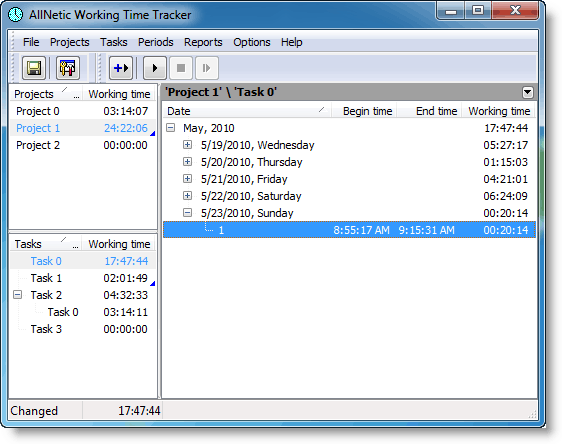 Tracks how much time you spend on different projects and tasks. Thanks to precise time tracking and accounting you can quickly and precisely calculate time spent on different tasks. You can bill your clients on time based on real reports. You can plan your working day better and be more effective in managing your time as you see, where your time is gone. The application doesn't occupy space on your desktop and is controlled from System Tray.
Windows | Shareware
Read More
TIMEANALYZER - TIME TRACKING TOOL 1.0
Business :: Project Management
 TimeAnalyzer automatically tracks your computer usage by recording your current foreground process in real time, and allow you identify how you spend a typical day on computer. The program can launch on Windows startup, minimize to system tray and silently monitor process activities in background. Its report system presents full-featured computer time distribution of a specific day and compare with average amount in the same week, month and year.
Windows | Shareware
Read More
Business :: Project Management
 Tracks and reports your computer usage by project and/or category. Personal Timeclock (TM) can help you with client billing, and can also save you money at tax time by reporting how much of your computer use was for business purposes. It is inexpensive, easy to use, and provides the written documentation the IRS wants to justify your business deduction for depreciation of your computer.
Windows | Shareware
Read More