


N5 Net Software Repository
Your one-stop for all your software needs.
Search N5 Net Software Repository:
Search Files
Sponsor:
Browse:
- Audio & Multimedia (1615)
- Business (4233)
- Communications (1267)
- Desktop (186)
- Development (607)
- Education (176)
- Games & Entertainment (710)
- Graphic Apps (685)
- Home & Hobby (106)
- Network & Internet (575)
- Security & Privacy (527)
- Servers (64)
- System Utilities (11758)
- Web Development (287)
Areas Of Interest
Authors Area
Are you a software author? Take a look at our Author Resource Center where you will find marketing tools, software specifically created for promoting your software and a ton of other helpful resources.
eClean 2000 3.0.4
(Click to Enlarge)
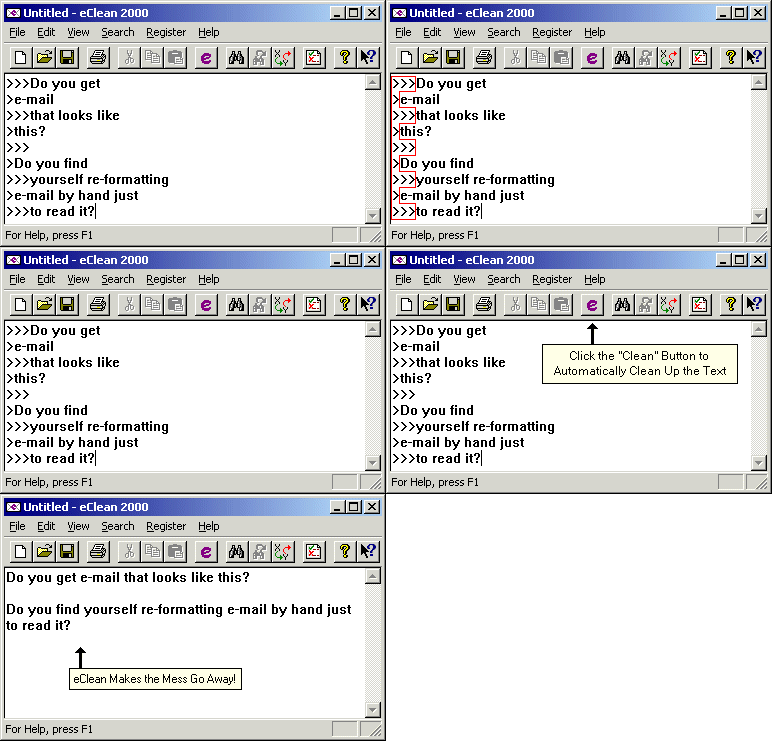
eClean 2000 ver 3.0.4 (formerly E-Clean) is a text editor you can use in place of Notepad. But eClean 2000 has one feature other text editors don't: it removes formatting marks from email messages leaving only legible text remaining. It automatically removes forwarding/reply marks ">" and unwanted line breaks in sentences and paragraphs. In addition this special feature eClean 2000 also supports all the basic text-editing functions, such as Open, Save, Undo, Search/Replace, and Print. Changes: In 3.0 eClean is now integrated with Microsoft Outlook In 2.1 eClean now operates as a system tray. This means that eClean's functionality is available automatically after your PC reboots. eClean's icon (an envelope) can be found in your system tray (lower right portion of the screen by the clock). Using the right mouse button, click on eClean's system tray icon to show a menu of commands that are available from the tray menu. Most notably, you can now clean the contents of the clipboard by simply copying some text into the clipboard and selecting "Clean Clipboard Contents..." from the tray menu. This will clean the text found in the clipboard without requiring you to open eClean, paste the text and recopy the text back into the clipboard. This is a real time saver!!!. Author's Email Address: eClean@bigfoot.com To install: UnZIP ECLEAN30.ZIP and run setup.exe Documentation: EClean.hlp, Sample.txt This upload replaces version 2.1.0 (EClean21.zip)
Specifications:
Version: 3.0.4 |
Download
|

Similar Products:
::
 This tool allow to save the records from Clarion file (.dat) to text file.
This application don't use any external libraries (no ODBC, no ADO etc) and you may run this tool on computer without any additional setup/install.
All features are available via command-line arguments so you could automate any task
This tool allow to save the records from Clarion file (.dat) to text file.
This application don't use any external libraries (no ODBC, no ADO etc) and you may run this tool on computer without any additional setup/install.
All features are available via command-line arguments so you could automate any task
Windows | Shareware
Read More
::
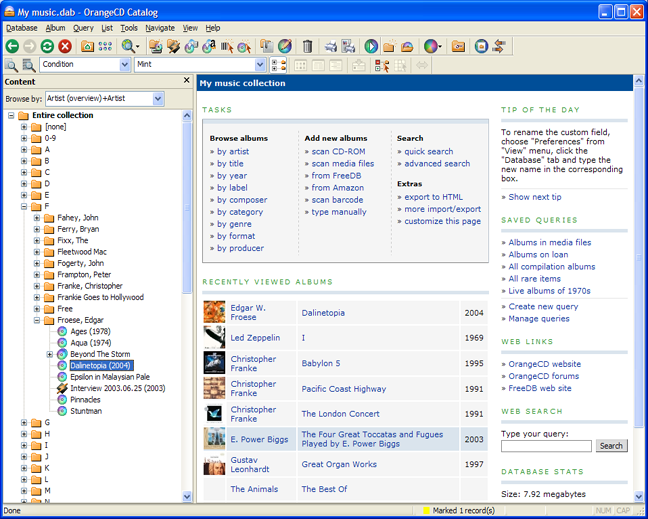 OrangeCD Catalog is the comprehensive music database program for cataloging music in any format: CD, DVD, MP3, iTunes, OGG, FLAC, WMA files, and even LPs and tapes. It can manage classical music as well as pop music. To add a new CD to the database, you just need to insert it in your computer, and OrangeCD will download all information from Internet. You can use resulting database for browsing, searching, and publishing on the web.
Windows | Shareware
Read More
::
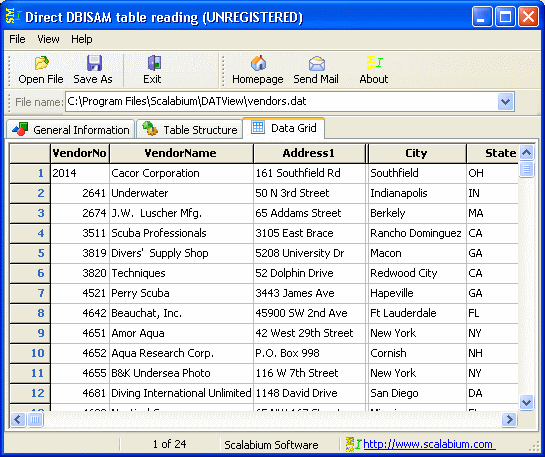 This tool allow to read/open the DBISAM tables on any computer.
Application don't use any external libraries (no ODBC, no ADO etc) and you may run this tool on computer without any additional setup/install.
You may see the full DBISAM system information (file version, header size etc), table structure (all field types supported) and data in grid.
All features are available via command-line arguments so you could automate any your tasks
This tool allow to read/open the DBISAM tables on any computer.
Application don't use any external libraries (no ODBC, no ADO etc) and you may run this tool on computer without any additional setup/install.
You may see the full DBISAM system information (file version, header size etc), table structure (all field types supported) and data in grid.
All features are available via command-line arguments so you could automate any your tasks
Windows | Shareware
Read More
::
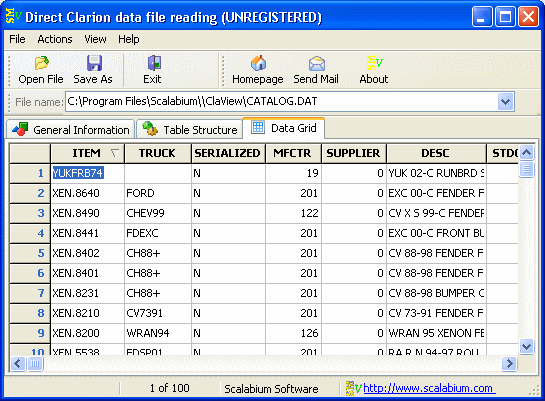 This tool allow to read/open the Clarion tables on any computer.
An application don't use any external libraries (no ODBC, no ADO etc) and you may run this tool on computer without any additional setup/install.
You may see the full Clarion system information (file version, header size etc), table structure (all field types supported) and data in grid.
All features are available via command-line arguments so you could
automate any task
This tool allow to read/open the Clarion tables on any computer.
An application don't use any external libraries (no ODBC, no ADO etc) and you may run this tool on computer without any additional setup/install.
You may see the full Clarion system information (file version, header size etc), table structure (all field types supported) and data in grid.
All features are available via command-line arguments so you could
automate any task
Windows | Shareware
Read More